Digital WiFi QR Code Sign: What to Print and Where to Put It
Share
Guests ask for the WiFi password constantly. A clear QR code sign answers the question before it is asked and saves your staff time. The sign is simple, but a few choices decide whether people notice and use it.
What the sign should say
Keep the text short and in the language of your guests. A good sign has three parts:
- A headline, such as "Free WiFi" or "Connect in one scan".
- The QR code, large and with clear space around it.
- A fallback line with the network name, in case a guest cannot scan.
If you serve international guests, add a second language. For a hotel, consider adding the room or area name when you have different networks. For a general introduction, see our guide to free WiFi QR codes and signage.
Size and contrast
A QR code needs contrast and quiet space. Dark code on a light background works best. Avoid glossy surfaces that reflect ceiling lights and avoid placing the code on patterned backgrounds. As a rule of thumb, bigger is easier: a code that fits comfortably in the palm of a hand is easy to read from a short distance.
Materials
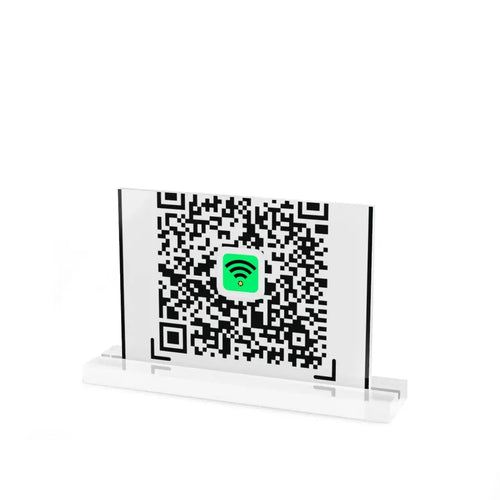
- Table stands in acrylic or plexiglass stay clean and hold the sign upright. See the display stands.
- Wall signs and plaques suit reception areas and corridors. Browse the signage collection.
- Stickers can go on windows, doors and counters, as long as the surface is smooth.
Where to put it
Place the sign where guests already look and wait:
- On tables, at eye level when seated.
- At the entrance or near the host stand.
- At the reception desk and in hotel rooms.
- Near the till, where guests often wait.
For layout ideas, read how to place QR and NFC stands.
Combine WiFi with a review request
Guests who are connected and comfortable are often ready to leave a review. Keep the WiFi sign and the review card separate so each message stays clear, but place them in the same area.
Test before you print
- Scan the code with an iPhone and an Android phone.
- Check that the phone joins the network without asking for a password.
- Print one copy first and test it in the real lighting.
Keep it up to date
If you change your WiFi password, the printed code stops working. Update the sign at the same time, or use a separate guest network whose details rarely change.
Frequently asked questions
Is a QR code safe for guest WiFi?
Use a separate guest network, not the one for your till or staff devices. This is good practice whatever method you use to share it.
Can I use NFC for WiFi too?
Yes, an NFC tag can store network details so guests tap to join, though a QR code covers more phones.
How long does delivery take?
Orders ship with tracking, and cost and timing appear at checkout. See the shipping page.
A readable code, short wording and a good position are all you need.